
Work that shows how we think.
Three builds, each solving a real problem end to end.
Hear It Once
A conversational AI assistant for card services that never makes a caller repeat themselves.
The problem
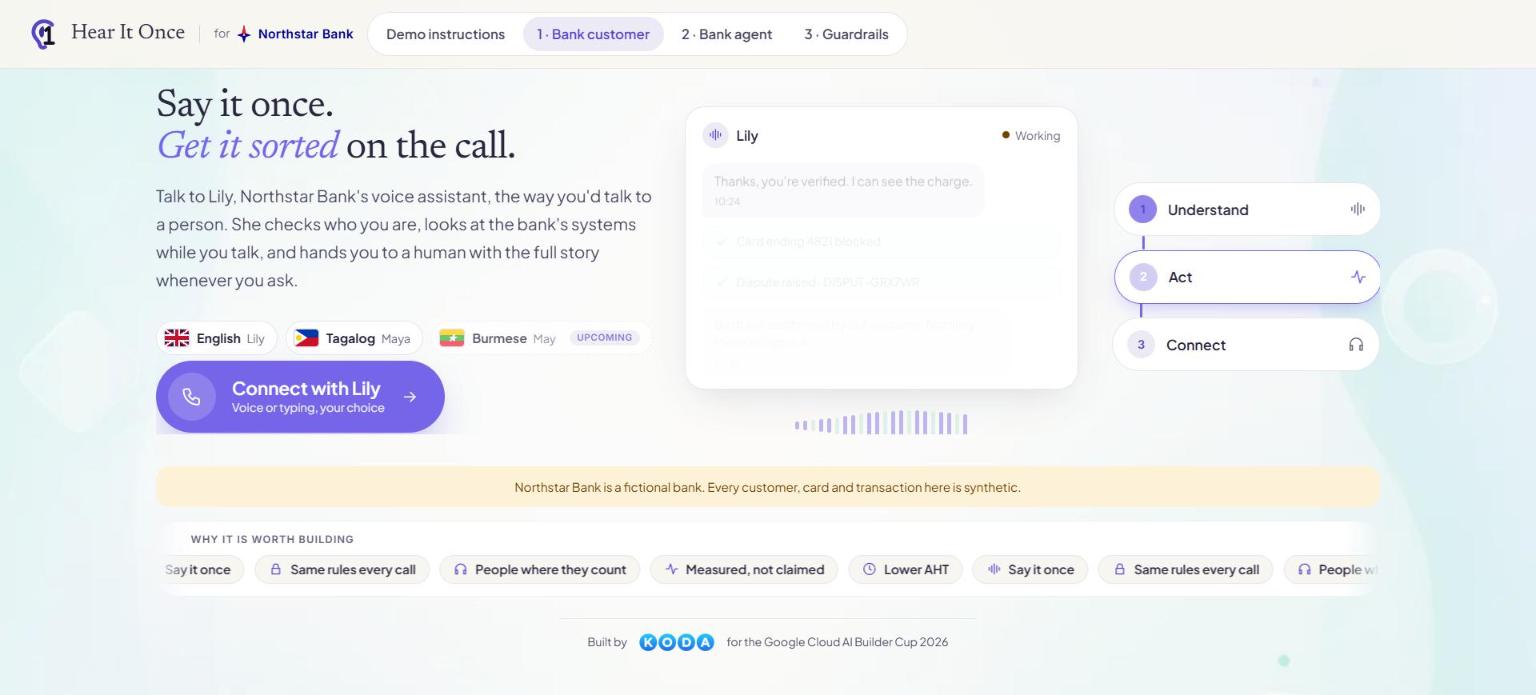
When customers call about a card, they work through phone menus, explain the issue, prove who they are, and then explain it all again to a human. Agents start each call with no context, calls run long, and customers leave frustrated. Trying to fix this with AI raises its own risk, because an assistant that can block a card or open a dispute must never act wrongly.
What we built
A conversational AI assistant that handles the call from the first word: it understands the issue once, verifies the caller, checks the bank's systems, explains what they confirm and carries out only the actions the customer agrees to. Anything it cannot handle safely goes to a person with the full context. It is a working prototype with synthetic customers and a fictional bank, and it is the first product we are building at KODA.
How it works
- 1It answers without a phone menu
The caller simply talks. There is no keypad menu to navigate, and the assistant says clearly at the start that it is an AI.
- 2The issue is captured once
The assistant listens, works out what the problem is and records it, so the customer is never asked to repeat it to the next person or system.
- 3Identity comes before anything else
Nothing about an account is revealed until the caller passes a security check. That decision is made by the back end from the records, never by the AI model.
- 4Several systems are checked at the same time
Card, transactions, payments, fees and fraud flags are looked up in parallel, and the assistant explains only what those systems actually confirm.
- 5Actions need clear consent and pass policy checks
Blocking a card or raising a dispute happens only after the customer says yes to that specific action and a rule engine confirms it is allowed. Every step is confirmed by the system that carries it out, and an unknown result is never reported as success.
- 6A case is created during the call and people stay in the loop
A case is opened as the call goes on. If the customer asks for a person, or the assistant cannot proceed safely, a human agent receives the call with a full summary already written.
What it can do
- Natural conversation by voice or typing, in English and Tagalog
- Identity verification with limited retries and safe escalation
- A live agent workspace with call summary, transactions, case history and an AI copilot
- Warm handover to a human with the full story attached
- A tamper-evident audit trail and an instant off switch
- Tested against a set of realistic scenarios, including system outages and fraud attempts
What this means for your business
Any business that handles customer calls, such as banks, insurers, telecoms and clinics, can shorten calls and reduce repeat explanations without handing control to an unchecked AI. The design principle carries over: let the AI hold the conversation, and let rules and records make every decision that matters. We apply it to contact center automation, conversational AI assistants and safe AI workflows.
Built with
CozyBoard
A calm, offline-first workspace where tasks, ideas and plans live together on one infinite canvas.
The problem
Most productivity tools assume you are always online and think in rigid lists. Tasks end up in one app, notes in another and plans on a whiteboard, so context is lost between them. Cloud accounts add a privacy worry, and busy, cluttered interfaces make planning feel like more work.
What we built
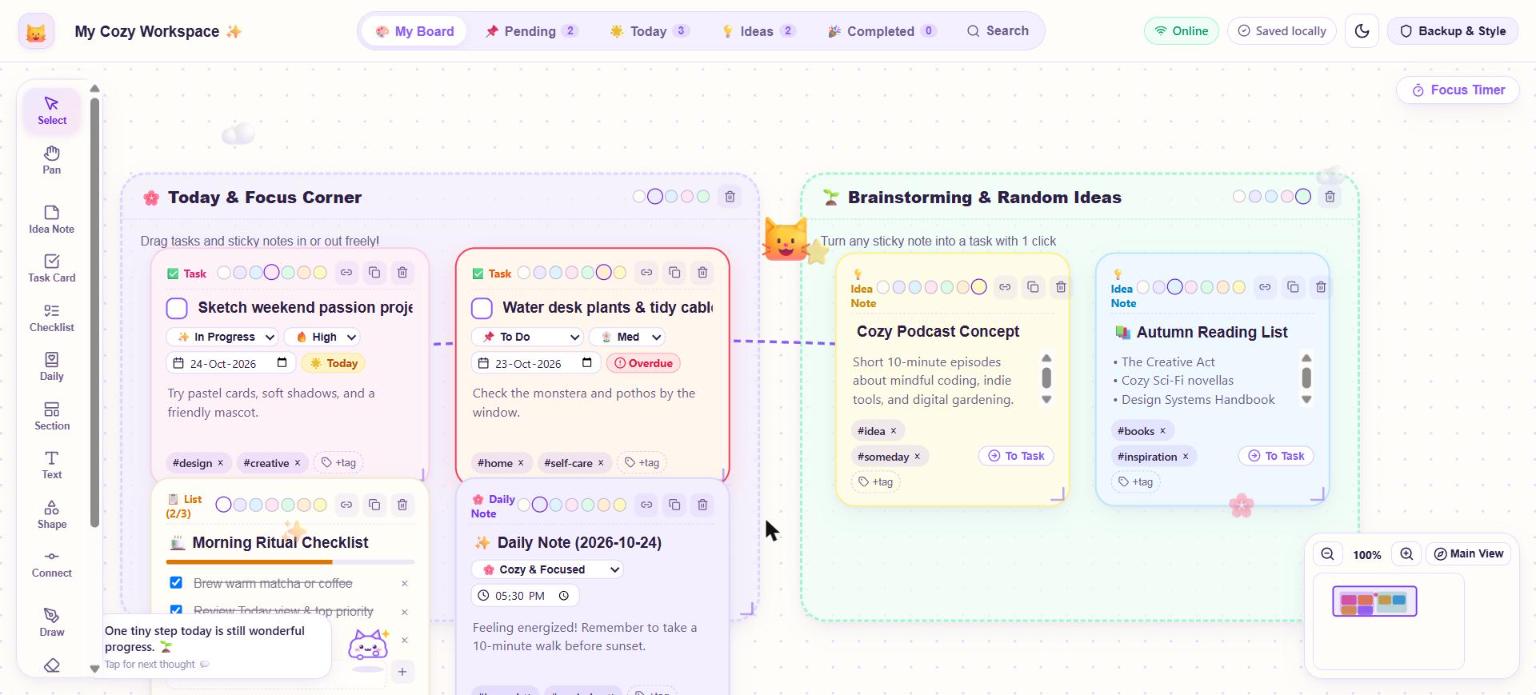
A single board where every kind of work item lives side by side: task cards, sticky notes, checklists, daily notes, sections, shapes and freehand drawings. Everything is saved on the device, loads without internet and needs no account. It is built to feel friendly, so people actually open it every day.
How it works
- 1Every change is saved instantly on the device
Work is written to a local IndexedDB database the moment it happens. The database is versioned with safe migrations, so an update to the app never wipes someone's data.
- 2A canvas engine positions everything
Each item has coordinates, size and layer. The canvas supports panning, zooming from 25 to 250 percent, multi-select, grouping, copy and paste, undo and redo, and a minimap for orientation.
- 3One data model powers many views
The same items appear on the board and in focused views: Pending, Today, Ideas, Completed and Search. Filters by status, priority, due date and tag stay in sync, and badges such as Overdue and Today are calculated from due dates automatically.
- 4A service worker makes it work offline
The app shell is cached, so it opens and runs with no connection and can be installed like a native app.
- 5Users stay in control of their data
One click exports a full backup file, and a restore brings it back. Clear storage notices explain where data lives.
What it can do
- Task cards with status, priority, due dates, tags and a small celebration when completed
- Sticky idea notes that turn into tasks with one click
- Checklists with live progress bars and daily notes with reminders
- Connectors, shapes, stickers and freehand drawing with an eraser
- Four background styles, light and dark mode and a focus timer
- Backup export and restore, plus an automated test suite
What this means for your business
The same approach suits any team that works with unreliable internet or cannot put data in the cloud: field staff, clinics, branch offices and small businesses that want internal tools without monthly software fees. We design offline-first apps that stay fast, keep data private on the device and still feel modern to use.
Built with
QuakeSense
Live earthquake intelligence that turns raw seismic data into clear answers for communities.
The problem
After an earthquake, official sources publish magnitude, depth and coordinates within minutes. Those numbers do not tell an ordinary person what they need to know: was it dangerous, does it affect me, can I trust what I am reading, and where do I go now. General chatbots make it worse, because they will confidently invent earthquakes that never happened.
What we built
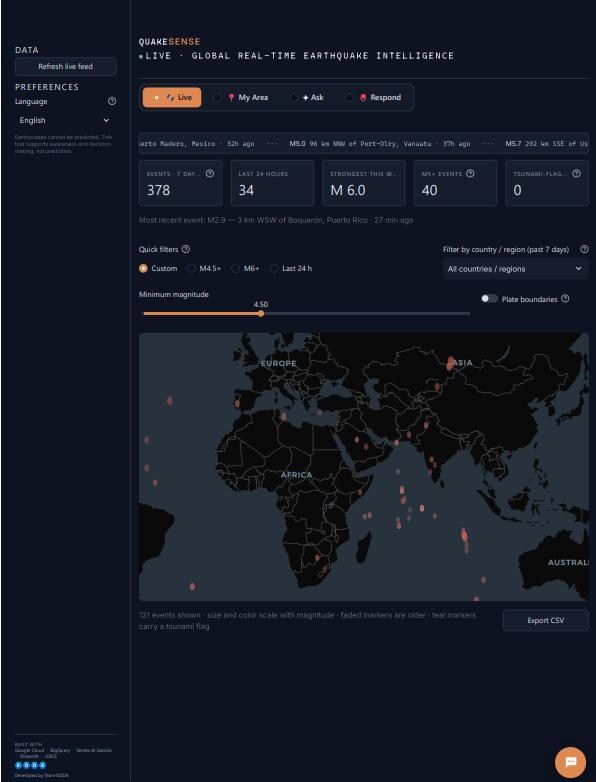
A situation room built around those four questions. It combines the live USGS feed with a 50 year catalog of more than 86,000 events stored in BigQuery, and uses Gemini to explain it in plain language. It never predicts earthquakes, says so on every page, and shows its evidence so every figure can be checked.
How it works
- 1Data is collected and stored for fast analysis
The live USGS feed and the historical catalog are loaded into BigQuery, alongside a town database, so both recent and long-term questions can be answered quickly.
- 2Each question is routed to the right source
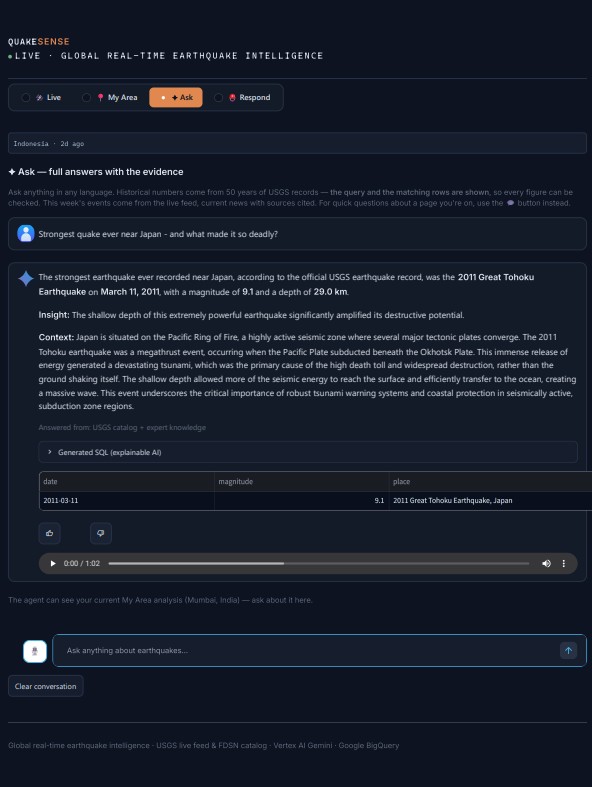
In the Ask page, historical questions become SQL over the verified records, this week's questions come from the live feed, and current events use web search with cited sources.
- 3Safety checks sit around the AI
Only read-only SELECT queries can reach the database, and every query is validated first. The generated SQL and the matching rows are displayed, so users can verify any number.
- 4Local risk profiles are built from real history
For any town, the system counts what has happened within 300 km since 1975, then writes a risk profile in one of 10 languages with charts and a map.
- 5Everything degrades gracefully
Each AI step has a rule-based fallback, so if a service is down the page gives a simpler answer instead of failing. Partial reruns keep the map responsive.
- 6Help is one step away
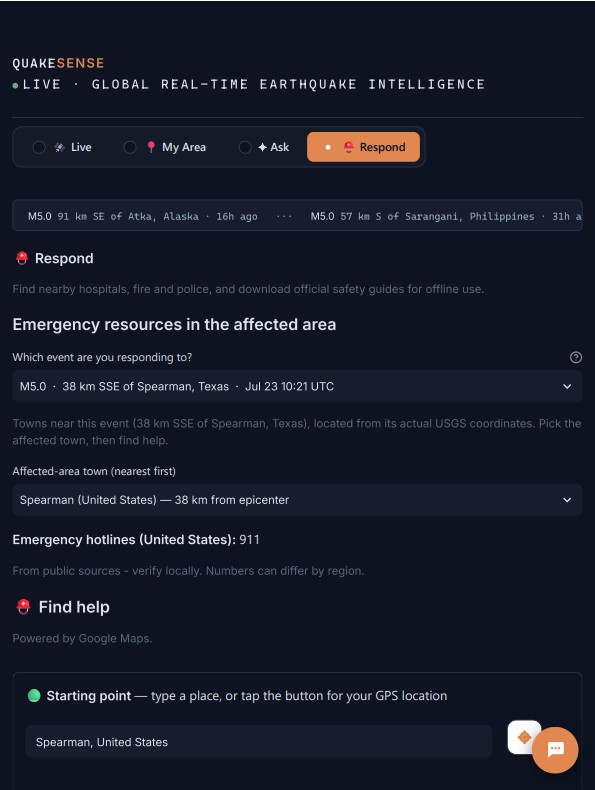
The Respond page finds the nearest hospitals, fire stations and shelters from the user's location, shows a route, and links to an offline library of official safety guides.
What it can do
- Live world map with magnitude filters, tectonic plate boundaries and tsunami flags
- Plain-language community briefings for significant events
- Unusual-activity alerts compared against a region's own 50 year average
- A chat agent that answers in any language, by text or voice
- Aftershock outlook and rain or landslide advisories, added after interviews with people in Mandalay
- Interface available in 10 languages, with a floating help assistant
What this means for your business
Any organisation sitting on large amounts of data can give staff or customers a trustworthy question and answer layer, instead of dashboards nobody reads. We build data pipelines, natural-language analytics with visible evidence, multilingual interfaces and safeguards that keep AI answers accurate. It applies to operations, finance, public services and NGOs alike.
Built with
In development
Our first product is on the way.
AI for financial services
An AI platform that helps banks and fintechs in Southeast Asia spot customer problems earlier, investigate them with evidence and respond with confidence. Built for local languages. Early conversations are open.
Talk to usWant a project like these?
Tell us the challenge and we will suggest a clear next step.